Local Guides levels and points, explained
Updated October 19, 2026
Local Guides is Google Maps’ program for people who contribute to the map. Each review, photo, edit or answer earns points. The points decide your level, from 1 to 10, and badges reward particular kinds of contributions along the way. Google publishes the whole table on its help page “Local Guides points, levels & badging”, and the figures below come from it, checked in October 2026.
How many points each contribution earns
| Contribution | Points | In Pinwrap’s estimate |
|---|---|---|
| Review | 10 | Yes |
| Review of more than 200 characters | +10 bonus | Yes |
| Rating | 1 | Yes |
| Photo | 5 | Yes |
| Photo tag | 3 per tag | No, not in the export |
| Video | 7 | Yes |
| Caption on a photo update | 10 | No, not in the export |
| Answer to a question about a place | 1 | Yes |
| Response to a Q&A | 3 | Yes |
| Edit | 5 | Yes |
| Place added | 15 | Yes |
| Road added | 15 | Yes |
| Fact checked | 1 per fact | No, not in the export |
| Reported as incorrect | 1 per item | No, not in the export |
A review with text and a star rating counts as a review, and a star rating on its own counts as a rating. The long review bonus is what makes the biggest difference over time. A review of more than 200 characters earns 20 points, twenty times a bare rating. The answers worth 1 point are Google’s short questions about a place, like whether it has outdoor seating. Q&A was a separate feature, which Google closed at the end of 2025, although its row is still in the table.
Views are not in the table. A photo seen a million times earns the same 5 points as one nobody opened. Views do count for some badges, as the guide to photo views explains.
The ten Local Guides levels
| Level | Points needed |
|---|---|
| 1 | 0 |
| 2 | 15 |
| 3 | 75 |
| 4 | 250 |
| 5 | 500 |
| 6 | 1,500 |
| 7 | 5,000 |
| 8 | 15,000 |
| 9 | 50,000 |
| 10 | 100,000 |
The first levels come quickly. Two reviews take you to level 2, and thirteen reviews of more than 200 characters reach level 4, where your Local Guides badge starts to show on your profile and your contributions. After that each step is much longer. Going from level 9 to level 10 alone asks for 50,000 points. Google notes that new points can take up to 24 hours to appear.
Points don’t expire. They can go down when Google removes content for breaking its policies, and contributions to places that closed for good and were taken off the map stop counting. Since 2026, Google shows your total points on the Contribute tab and highlights your level on your profile.
Local Guides badges
Badges are separate from levels. There are six families, and each one except New Contributor has three tiers, Novice, Expert and Master. Once earned, a badge stays.
| Badge | Novice | Expert | Master |
|---|---|---|---|
| Reviewer | 3 reviews | 25 reviews, 5 of more than 200 characters, 5 reactions to your reviews | 100 reviews, 50 of more than 200 characters, 50 reactions |
| Photographer | Photos of 3 places | Photos of 25 places, 100 photos, 100,000 photo views | Photos of 100 places, 1,000 photos, 1,000,000 photo views |
| Director | Videos of 3 places | Videos of 25 places, 100 videos, 100,000 video views | Videos of 100 places, 1,000 videos, 1,000,000 video views |
| Trailblazer | First photo of 1 place, first review of 1 place, 1 place added | 10 of each | 50 of each |
| Fact Finder | 3 place updates, 25 answers | 25 updates, 250 answers | 100 updates, 1,000 answers |
New Contributor, the first badge, asks for 2 photos, 2 reviews and 2 answers.
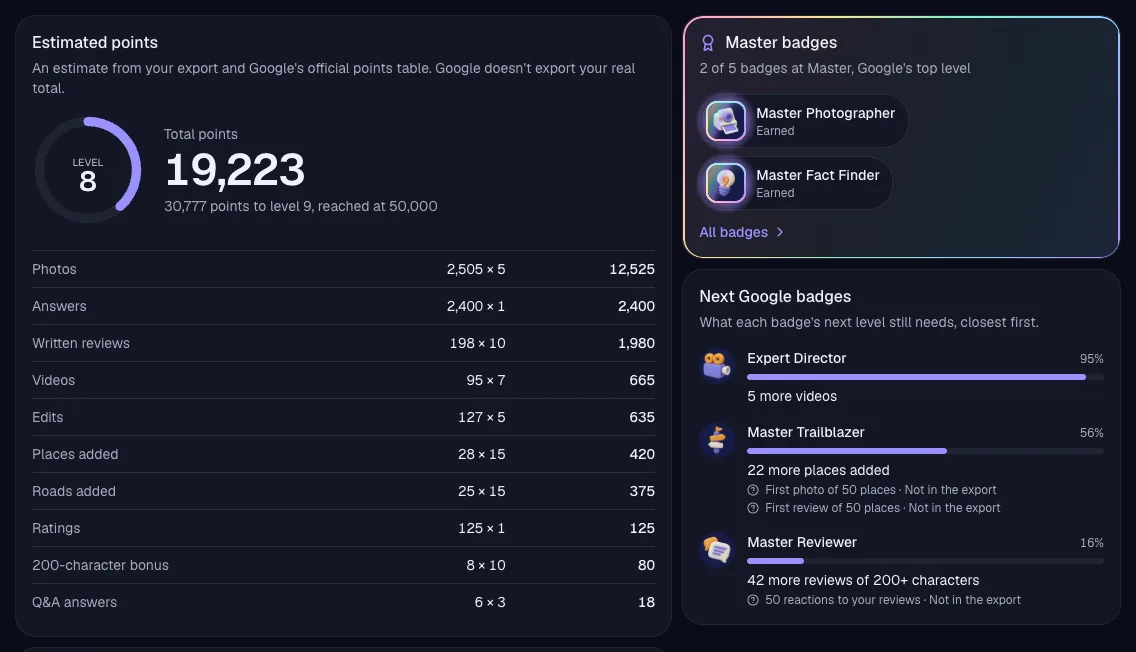
Why Pinwrap’s points are an estimate
Google doesn’t put your points, your level or your badges in any export. Pinwrap counts what your export contains and applies the table above. Four rows can’t be counted that way, photo tags, captions, checked facts and reports, so your real total can be a little higher. It can also be lower, if Google removed some contributions that your export still lists. The badges follow the same logic. Reactions to your reviews and being the first to add a photo or a review to a place aren’t in the export, so a badge that depends on them is marked as likely rather than earned.
How to reach the next level
The table rewards effort more than volume, and the quickest ways up are the ones that help other people most.
- Write reviews of more than 200 characters. Say what you ordered, what it cost, when to go. That’s 20 points instead of 10.
- Review the places you’ve photographed. Pinwrap lists the places where you added photos but never wrote a review, each worth at least 10 points.
- Turn your bare star ratings into reviews. A rating earns 1 point, a review 10.
- Add missing places and fix wrong opening hours or addresses, for 15 and 5 points.
- Take photos and short videos of the places you review, which also count toward the Photographer and Director badges.
Contributions that break Google’s policies are removed, along with their points, so there’s no shortcut worth taking.
Pinwrap’s own levels
Pinwrap also has its own progression, 100 levels earned with XP from your export, with achievements for things Google doesn’t reward, like countries visited or long streaks. It’s independent from Google’s program and is part of the Pinwrap recap.
Questions and answers
How many points do you need for Local Guide level 10?
100,000 points. Level 9 starts at 50,000, so the last step alone asks for 50,000 more, about 2,500 reviews of more than 200 characters.
Do Local Guide points expire?
No. Google says points don't expire, but they can go down if content is removed for breaking its policies.
Can you exchange Local Guide points for rewards?
No. Points can't be redeemed for money, gifts or discounts. They set your level, and from level 4 your Local Guides badge shows on your profile. Google also mentions early access to new features and invitations to events, but these perks are occasional and can change without notice.
How long do new points take to show?
Google says your points and level can take up to 24 hours to update after a contribution.
Why is Pinwrap's total different from my profile?
Google doesn't export your points, so Pinwrap estimates them from the contributions in your export with Google's official table. Photo tags, captions, checked facts and reports aren't in the export, which can make your real total higher. Removed contributions can make it lower.
Try it with your own export
Drop your Takeout export on Pinwrap's home page. Your browser reads it without uploading anything, and your stats open a few seconds later. No export yet? The demo shows everything with invented data.