How to see the views of your Google Maps photos
Updated October 11, 2026
Every photo and video you add to Google Maps keeps a count of how many times it has been seen. Google adds them up into a total, but it shows these numbers in different places and never as one list of all your photos that you could sort. This guide explains where to find them, what they measure, and how to see the views of every photo together.
Where Google shows your photo views
In the Google Maps app, the Contribute tab shows your contributions along with the total views of your reviews and of your photos. Your profile, which you open from the same tab or from your picture, shows the views and reactions on what you published. Open one of your own photos there and you see its views.
On a computer, the menu’s “Your contributions” section lists your photos and videos as well. Large totals are rounded, so 1,234,567 views become 1.2M on screen.
That’s enough to check a total now and then. It’s not enough to answer simple questions, like which photo brings most of your views, how many views you gained this year, or in which countries your most seen photos were taken.
What counts as a view
Google doesn’t publish an exact definition of a photo view. Judging by how the numbers behave, a view is counted when your photo is shown to someone, for example in a place’s photos on Maps or in Google Search, whether or not they open it full screen. It works more like an impression than a visit.
That explains a lot. A photo near the top of a busy restaurant’s gallery is shown to almost everyone who looks the place up, every day, for years. A photo of a quiet chapel may be seen a few times a month. Both took you the same effort.
Why your totals look so big
Views pile up in ways other contributions don’t. A review is read now and then, but a good photo of a popular place can be shown thousands of times a day, and it keeps counting long after you’ve forgotten it.
They are also uneven. Often a handful of photos collects most of the views, typically the ones shown first for well-known landmarks, stations or restaurants. Pinwrap measures this with one figure, the share of all your views that your top 10% of photos collect.
See the views of every photo at once
Google Takeout gives what the app doesn’t. In the export, each photo and video has a small JSON file beside it with its number of views on the day of the export. The guide to Google Takeout explains how to get it.
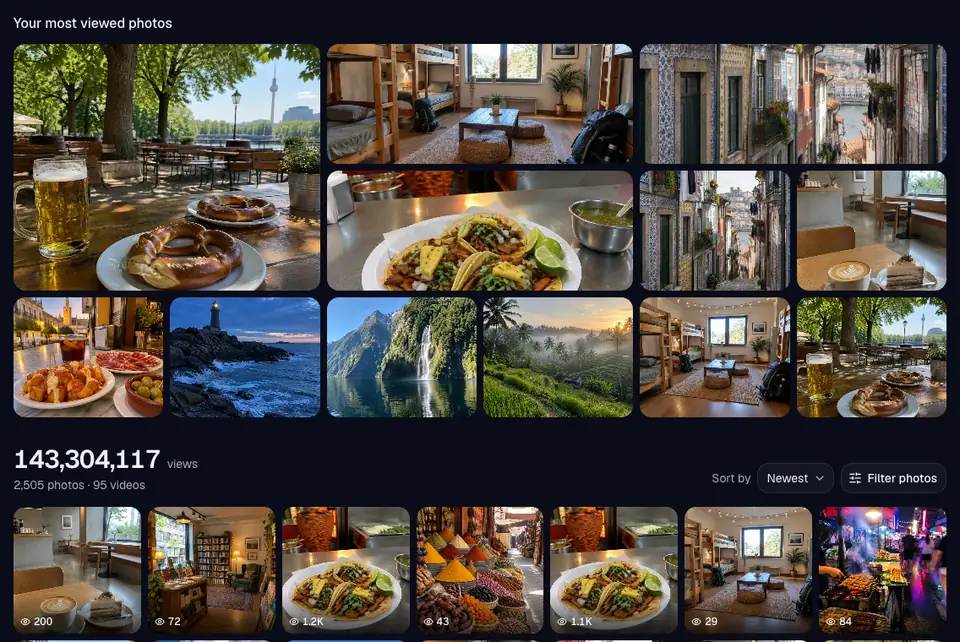
Pinwrap reads all those files in your browser and puts them together.
- The exact total, not rounded, for photos and videos.
- Your most viewed photos and videos first, then the whole gallery, sortable by views, date, country or place.
- Views by country, by camera and by orientation, and how long you usually wait between the shot and its publication.
- The photos rising fastest, measured in views per day since they were published.
Follow your views over time
An export only tells you where you stand today. To see how your views grow, save a snapshot in Pinwrap’s Progress tab. It’s a small file that stays on your device. A few weeks later, make a new export, open it, then load the snapshot in the same tab. Pinwrap shows what changed, photo by photo, including the views each one gained.
Photo views and Local Guides badges
Views don’t earn Local Guide points. Google’s points table has no line for them, as the guide to levels and points shows. They matter for badges, though. The Photographer badge counts photo views and the Director badge counts video views, next to the number of photos or videos and the number of places they show.
| Badge | Places | Photos or videos | Views |
|---|---|---|---|
| Novice Photographer | 3 | ||
| Expert Photographer | 25 | 100 photos | 100,000 |
| Master Photographer | 100 | 1,000 photos | 1,000,000 |
| Novice Director | 3 | ||
| Expert Director | 25 | 100 videos | 100,000 |
| Master Director | 100 | 1,000 videos | 1,000,000 |
Pinwrap checks each of these against your export and shows how far you are from the next one.
Why the numbers differ from Google’s
A few gaps are normal. The export is a snapshot of the day you requested it, while your profile keeps counting. The profile rounds what the export gives exactly. Some exports have listed 0 views for photos seen fewer than 100 times, and a photo Google removed is gone from both. If a figure looks far off, a new export usually settles it.
Questions and answers
Do photo views earn Local Guide points?
No. Google's points table has no line for views. They do count for two badge families, Photographer for photos and Director for videos, from 100,000 views at the Expert level.
Why does my profile show a different number from my export?
The export is a snapshot of the day you requested it, while your profile keeps counting. The profile also rounds large figures, some exports list 0 views for photos with fewer than 100, and photos Google removed no longer count anywhere.
Can I see how many views each of my reviews got?
No. The Contribute tab gives a total for your reviews, but Google doesn't show the views of each review, and the export has no view counts for reviews at all. Photos and videos are the only contributions with a count of their own.
How can I find my most viewed photo on Google Maps?
Export your data with Google Takeout and open it in Pinwrap. The Photos tab starts with your most viewed photos and videos, and the whole gallery can be sorted by views.
Try it with your own export
Drop your Takeout export on Pinwrap's home page. Your browser reads it without uploading anything, and your stats open a few seconds later. No export yet? The demo shows everything with invented data.